
Features
Integrations Pricing Developers Guides

Your details and bank account

Give the account you are paid into, and choose what you are told about.

For affiliates 1 min read 3 steps 1 screenshots

A short page, but the one that decides whether a payment actually reaches you.

1

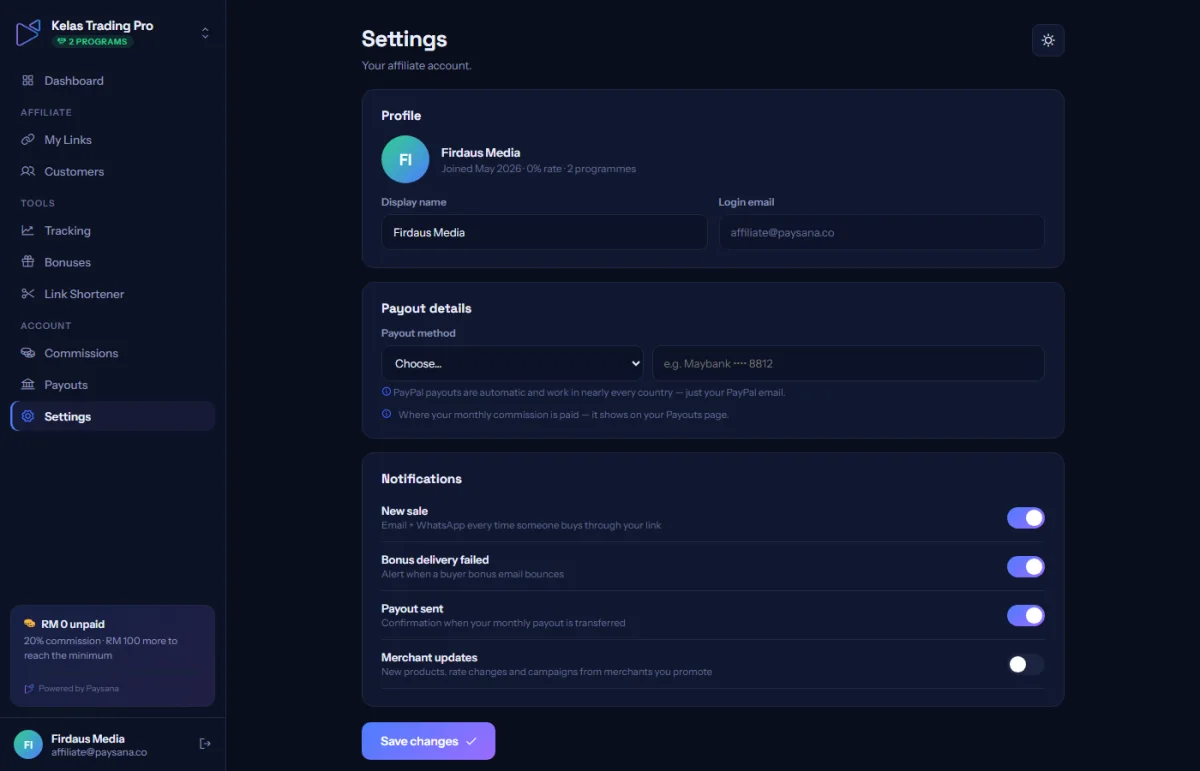
Set your display name

This is the name the businesses you promote see. It applies across every programme you are in.
app.paysana.co
Affiliate settings: display name, bank details and what you are notified about.
2

Enter your bank details

Bank name, account number and account holder name: all three, exactly as your bank has them. The business you promote pays your commission by transfer to this account, from their own bank in their own country, which is why an invite only accepts affiliates from the same country as the business.

3

Pick your notifications

Decide what you want to hear about: a new referral, a commission clearing, a payout sent. These apply across your programmes.

Worth knowing

  • Until all three bank fields are filled in, the business cannot pay you and your balance simply carries forward: it is not lost, but it is not paid either.
  • Your display name and bank details are shared across programmes; only your links, bonuses and earnings are per business.

Read next

Still stuck? Send us a message and a person will answer, usually within one working day.
Contact us

Ready to try it?
Start free today.

Join the businesses already using Paysana to collect payments, send invoices and grow.

Free plan forever · No card to sign up · Your own gateway
We use cookies to measure how this site is used and how well our advertising works. They are optional, and the site works exactly the same either way. Read our privacy policy.