
Features
All features
Describe the page you want and get a complete, ready-to-edit sales page built from your product's real details.
The AI draft is not a blank-slate writer. It is handed a fact sheet built from your own settings, your real price, any genuine discount, your description, how the product is delivered and how buyers pay, so the page it writes agrees with the checkout your buyer lands on.
Open the Landing page tab and pick AI draft. The tab shows what a page costs in AI credits and how many your balance covers, so there are no surprises. Write a brief in any language: who the page is for, what it should say, how it should feel. The page comes back in the language you and your product use.
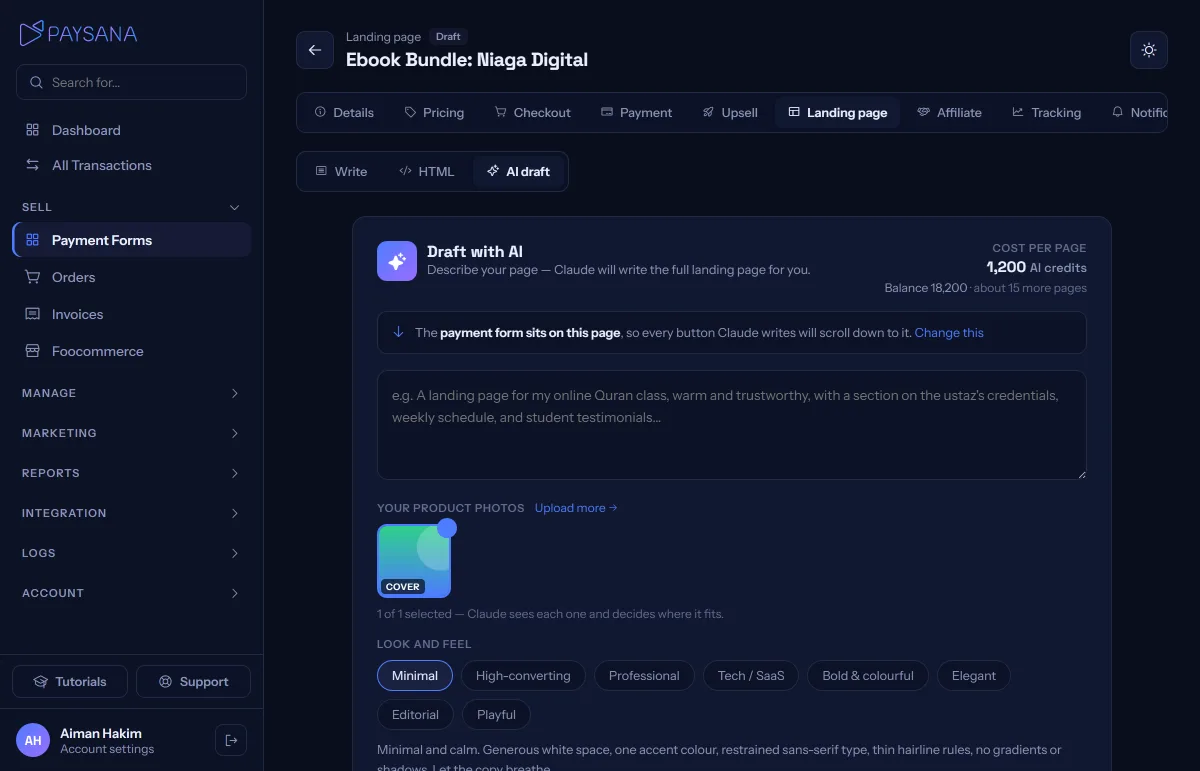
Your product's own photos appear as thumbnails, all selected to start with. The AI is shown each picture, not just given a link, so it writes around what is actually in the photo and places each one where it helps. Only your own images can ever appear on the page; it is never allowed to pull a stock photo from somewhere else.
Eight looks, each with a real design brief behind it: High-converting for a direct sales page, Professional for a corporate feel, Tech for a product-led software look, plus Minimal, Bold, Elegant, Editorial and Playful. The description under the picker tells you what each one means.
Writing a full page takes a minute or three, and it runs in the background, so you can leave the tab and return. The finished draft waits for you for a month. Preview it, regenerate with a sharper brief, then either Use and publish to take it live immediately, or Use, edit first to polish it on the HTML tab before switching it on.
Join the businesses already using Paysana to collect payments, send invoices and grow.